Prior to re:invent 2020 the only way to access S3 privately via a VPN was to have an EC2 instance running a proxy server to direct the traffic. That’s no longer the case with AWS PrivateLink for Amazon S3.
I have a site-to-site VPN configured to a VPC in eu-west-2, and an S3 bucket created.
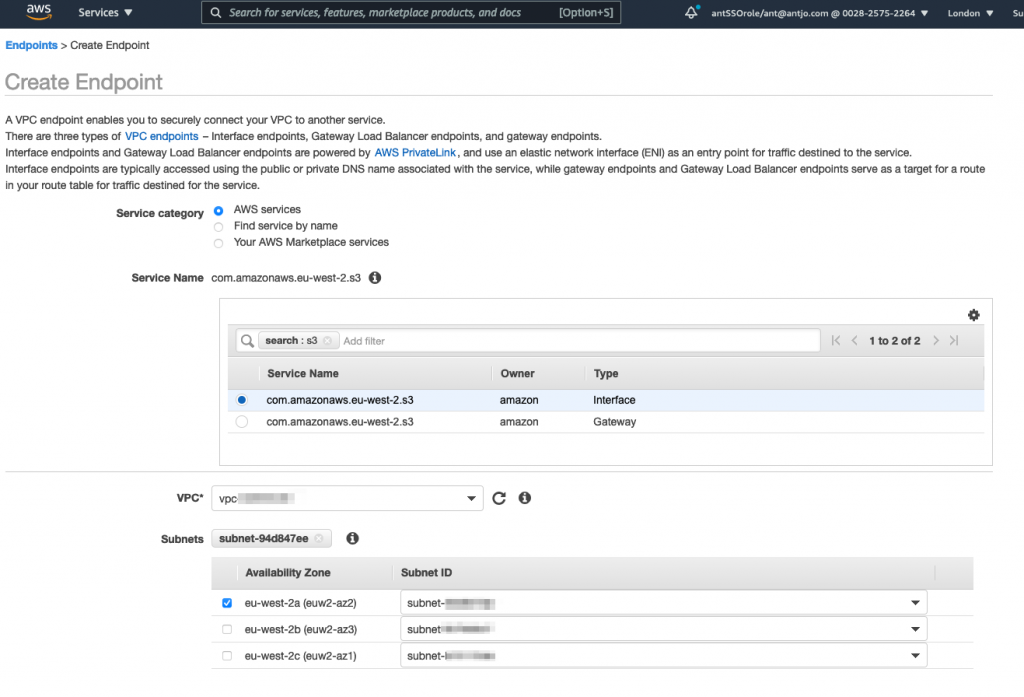
In the VPC I’ve created an Interface Endpoint for S3 – to do this go to ‘Endpoints’ in the left hand menu options and then click the ‘Create Endpoint’ button at the top of the page.
Filter the services by S3 in the search bar, and highlight the Interface Type, select the correct VPC and then select at least one AZ (I’ve only selected a single AZ as this is my lab account) – don’t click Create yet as we’ll also need to set the appropriate security groups in the options below:
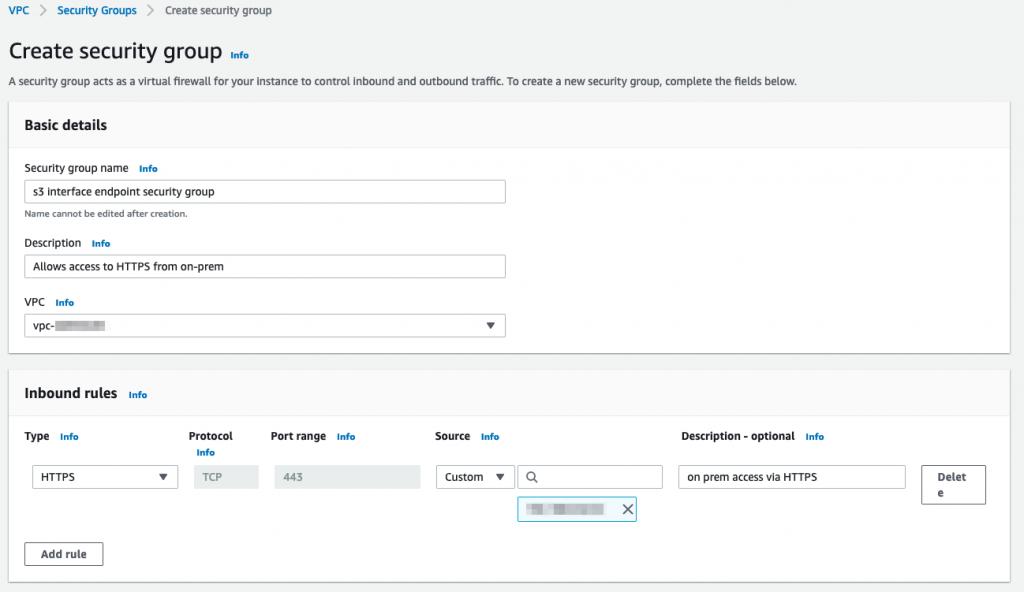
For the security groups you’ll need to create a new security group allowing HTTPS (tcp/443) from your on-premises IP range or address:
You can leave the policy for the endpoint as default for now and edit it if appropriate later, and click ‘Create Endpoint’.
Next create a new bucket, or select an existing one that you only want to be accessible via the Interface endpoint from on-premises via VPN or Direct Connect (private VIF) or the VPC itself.
Get the Endpoint ID for the endpoint you created, it can be found in the details panel under Endpoints in the console or by using the AWS CLI:
aws ec2 describe-vpc-endpointsNext head over to the S3 console and select your bucket, and the Permissions tab. In the Bucket Policy area click ‘Edit’.
Depending on the restrictions you want to impose on the bucket you could use a policy similar to this, that means that no actions at all can be utilised other than via the Interface Endpoint:
{
  "Id": "Policy1617817869338",
  "Version": "2012-10-17",
  "Statement":
    {
      "Sid": "Stmt1617817846605",
      "Action": "s3:*",
      "Effect": "Deny",
      "Resource": [
          "arn:aws:s3:::private-aws-bucket/*",
          "arn:aws:s3:::private-aws-bucket"
      ],
      "Condition": {
        "StringNotEquals": {
          "aws:SourceVpce": "vpce-09acd82d4becae6a2"
        }
      },
      "Principal": "*"
    }
}
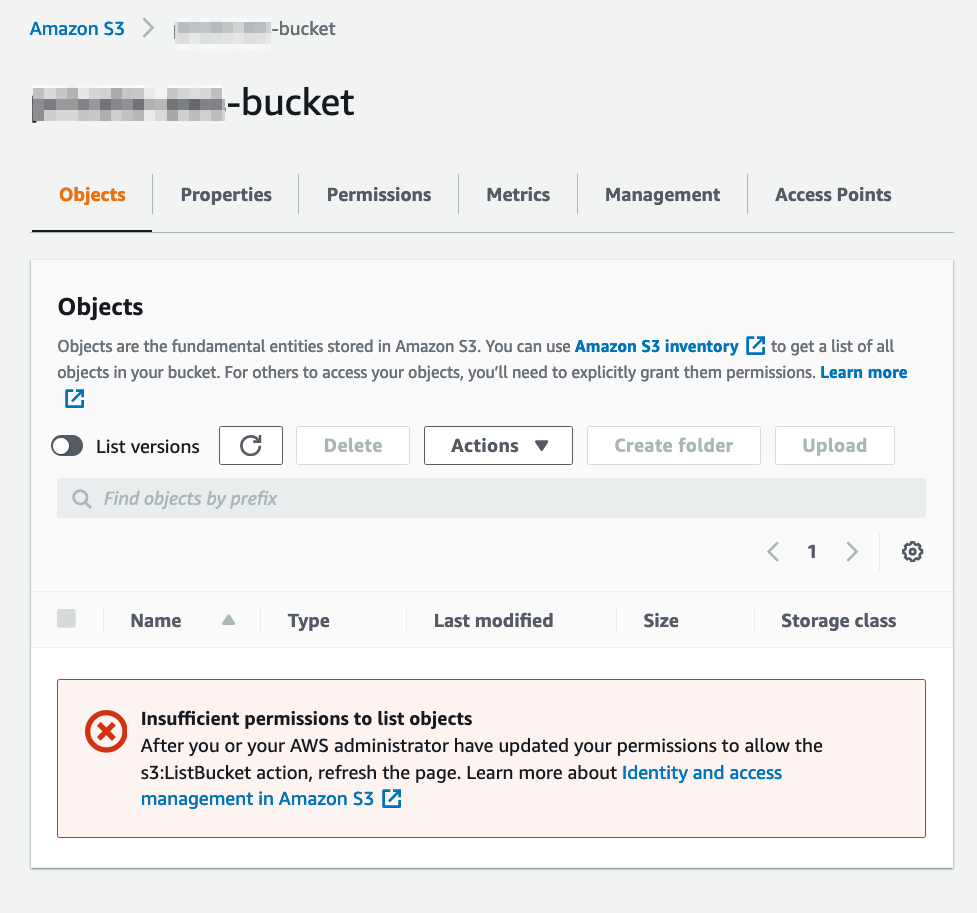
Using the above policy will even lock the console out of making further changes, so be careful with typos!
We have to use both bucket and bucket/* in the policy above to associate the bucket and the objects in the bucket, see https://docs.aws.amazon.com/IAM/latest/UserGuide/reference_policies_examples_s3_rw-bucket.html for further details.
If you want to reverse this, you can use the following CLI command via the Interface endpoint to delete the policy (assuming your endpoint is in eu-west-2):
aws s3api delete-bucket-policy --bucket bucket-name --endpoint-url https://bucket.vpce-endpoint.s3.eu-west-2.vpce.amazonaws.comNow to copy objects in or out of the bucket, or list objects in the bucket, or in fact any operation you have to use the parameter –endpoint-url https://bucket.vpce-endpoint.s3.eu-west-2.vpce.amazonaws.com with the command. For example:
aws s3 --endpoint-url https://bucket.vpce-vpc-endpoint.s3.eu-west-2.vpce.amazonaws.com cp /Users/Ant/file.txt s3://bucket-name/file.txt

upload: ../../Ant/file.txt to s3://bucket-name/file.txt
as without that additional parameter the VPC Interface endpoint won’t be used and the command will fail due to the bucket policy which only allows access via the Interface Endpoint:
aws s3 cp file.txt s3://bucket-name/file.txt

upload failed: ./file.txt to s3://bucket-name/file.txt An error occurred (AccessDenied) when calling the PutObject operation: Access Denied